App download web widget
Put an app’s icon, version and a working download button on your own site. Pick an app below, choose a style, and copy one line of code.
Only used to write the image’s alt text, so screen readers and search engines can tell what the card is. Leave it blank to use the package name.
Icon, name, developer, rating and a full-width download button.
Follows each visitor’s own light or dark setting.
Translates the button. The app’s own name and version always come from the store listing.
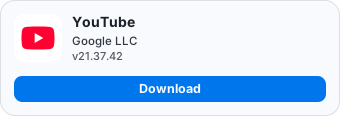
Live from com.google.android.youtube. If the card says the app was not found, we don’t hold that package yet.
<a href="https://apkcube.com/go?q=com.google.android.youtube&to=download" target="_blank" rel="nofollow noopener">
<img src="https://apkcube.com/embed/card/com.google.android.youtube.svg"
alt="Download YouTube APK"
width="340" height="116" loading="lazy">
</a>[](https://apkcube.com/go?q=com.google.android.youtube&to=download)Just want a link back?
If you would rather not show app details at all, these are plain badges. They carry no data about any app, so they never change — link them wherever you like.
For light pages
<a href="https://apkcube.com" target="_blank" rel="nofollow noopener">
  <img src="https://apkcube.com/embed/badge-dark.svg"
       alt="Download APKs from APKCube"
       width="180" height="54" loading="lazy">
</a>
For dark pages
<a href="https://apkcube.com" target="_blank" rel="nofollow noopener">
  <img src="https://apkcube.com/embed/badge-light.svg"
       alt="Download APKs from APKCube"
       width="180" height="54" loading="lazy">
</a>
Questions
- Where do I find an app’s package name?
- It is the last part of the app’s URL, on our site or on Google Play — the reverse-domain string like
com.spotify.music. You don’t have to dig it out yourself: paste the whole link into the field above and we’ll read it out. - Does it cost anything?
- No. The widget is free to embed on any number of pages, with no account and no rate limit you are likely to notice.
- Why does the code include rel="nofollow"?
- Search engines treat links carried by an embedded widget as unnatural unless they are marked, and an unmarked one can earn the site hosting it a penalty. The attribute protects you, not us — please leave it in.
- Can I restyle the card with CSS?
- Not from the outside — an image has no elements for your stylesheet to reach. Use the style and theme controls above instead, and size it by setting a width on the
img(it is vector art, so it stays sharp at any size). - What happens if the app is taken down or goes paid?
- The card notices. It stops showing a download button and says why — a paid app or one below our quality bar points at Google Play instead, and an app withdrawn on a rightsholder’s request simply reads as unavailable. You do not have to do anything.
- The card says the app wasn’t found.
- Then we don’t hold that package yet. Check the spelling first, and if it looks right you can ask for it from the APK Downloader — once the app is in the catalog its card starts working with no change to your code.
Building something bigger? The developer API gives you the same catalog as JSON, and business is where to reach us about anything commercial.